Print Map Studio
Country map posters

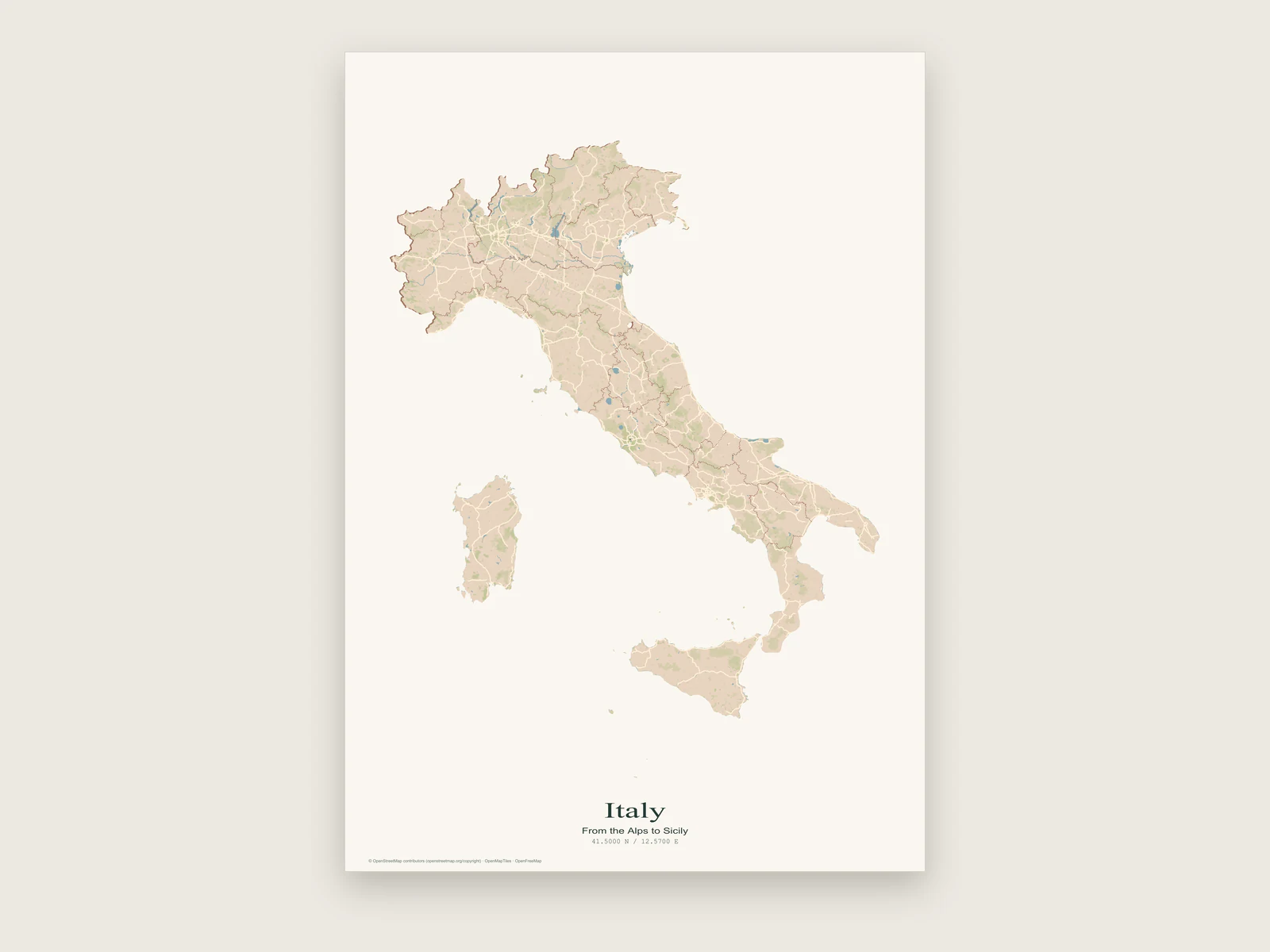
A country map poster cut to the shape of the country.

Pick a country, a state or a province and the map is clipped to its outline, with everything beyond the border left as plain paper. Inside, the streets, rivers and towns stay live, so you still choose the style, labels and page size.

  • 258 countries and territories
  • States, provinces and regions
  • Vector outline in PDF and SVG
  • Free, no account
Italy poster where the map is cut to the outline of the country, with Sicily and Sardinia included

How the shaped frame works

A country poster here is a real map cropped to a border. Roads, rivers, lakes and town names run right up to the coast or the frontier. Outside the border, the page is your paper colour.

The crop is done by a mask: an inverted shape that covers everything outside the boundary with your paper colour and leaves the inside open. It is a normal shape layer, so it exports like one. In PDF, layered SVG and layered PSD the outline stays vector, and the coastline edge is clean at any print size.

Boundaries come from Natural Earth 5.1.1 at 1:10 million scale, so islands and exclaves are part of the shape. The catalogue covers 258 countries and territories, and 251 of them have first-level regions: US states, Canadian provinces, German Länder, Japanese prefectures, Indian states and so on.

  • Country or region outline
  • Mask as a shape layer
  • Vector edge in PDF
  • States and provinces
Map frame set to Country / region with the Italy outline applied
Layout › Map frameChoose the frame shape, the country and the boundary.

The Map frame controls

Everything happens in one panel, Layout › Map frame. The fit moves the map, so switch off Lock map area in Map › View first if it is on.

  • Rectangle or Country / region

    Switch to Country / region to open the picker. Switching back to Rectangle hides the mask and keeps it in the project.

  • Country

    Pick from the full list of countries and territories.

  • Boundary

    Choose Entire country or one region. The camera moves so the boundary fills about 90% of the map area.

  • The mask layer

    A layer named after the place, for example "Portugal silhouette", appears in the layer list. Undo returns you to the previous frame.

Make one in five steps

  1. Pick a layout first

    Open Layout and choose Land & outline from the layout presets. It sets cream paper, dark green-grey type in a serif face and the Paper map style. The mask takes the paper colour at the moment you fit it, so settle the paper colour before step 3.

  2. Set the page

    Choose the size and orientation in Layout › Page. Tall countries such as Chile, Norway or Italy want portrait. Wide ones such as Russia, Canada or Indonesia want landscape.

  3. Fit the boundary

    In Layout › Map frame, choose Country / region, pick the country and then Entire country or a region. The map moves to the shape and fits it inside the frame.

  4. Tune what is inside

    Go to Map › Labels & details. For a big country, hide roads for a clean shape or keep them for texture. For a small one, keep labels on and raise the text scale.

  5. Title and export

    Type the name in Layout › Text and export. PDF keeps the outline and title as vector content, and PNG renders at 300 DPI.

Small countries and big countries print differently

The fit always fills the frame, so the scale changes enormously from one country to the next. Monaco on an A3 sheet is a street map. Canada on the same sheet is a coastline with a few city names. Plan the poster around what will actually be visible.

For a large country, a single region often makes a better poster than the whole: a US state, a Canadian province or an Australian state fits the page at a much closer scale.
Country sizeExamplesWhat you see inside the outlineSettings that help
City-statesMonaco, Singapore, Vatican CityIndividual streets, blocks, the harbourTreat it as a city poster with a shaped border. Keep street labels on.
Small countriesLuxembourg, Malta, Slovenia, CyprusTowns, main roads, rivers, forestsText scale around 130%, parks and land detail on.
Mid-sizedIreland, Portugal, Italy, JapanCoast, motorways, major citiesHide minor detail or labels for a shape-first look.
LargeBrazil, Canada, Australia, RussiaCoastline, big lakes and rivers, the largest citiesLandscape page, roads hidden, a strong style such as Night Ink or Coastal.

Type for a country poster

A shaped map is a busy silhouette, so the title works best when it is calm. There are three type families: Modern sans, Classic serif and Field notes mono. Sizes run from 6 to 120 pt, and the title, subtitle and caption each have their own font, size and colour.

One name, set large, usually beats a long subtitle. Long names such as "Bosnia and Herzegovina" shrink automatically to fit on one line, so try a smaller size and see if the spacing looks more natural. Match the type colour to the darkest colour in the map, such as the label colour of the style, rather than pure black.

The coordinates line shows the centre of the map in decimal degrees or degrees, minutes and seconds. On a country poster it marks roughly the middle of the country, which is a nice detail for a gift.

  • Placement: above the map, below it, or over it
  • Alignment: left, centre or right
  • Title up to 200 characters, subtitle and caption up to 400
  • Paper colour and margins from 0 to 100 mm per side in Layout › Page

Ready to start?

Pick a country and fit its outline to the page.

Make a country poster

Common questions.

Boundaries, regions, outlines in print and paper colour.

Which countries and regions can I use?

258 countries and territories from Natural Earth 5.1.1, plus first-level regions for 251 of them, such as US states, Canadian provinces, French départements and Japanese prefectures.

Can I make a poster of a single state or province?

Yes. After choosing the country, pick the region instead of Entire country. The map fits that region and masks everything around it, including the rest of the country.

Will the outline print sharply?

Yes. The outline is a vector shape in PDF, layered SVG and layered PSD exports, and PNG renders it at 300 DPI for the page size you set.

Can I change the paper colour after fitting the outline?

Yes. Change the paper colour, switch the map frame to Rectangle, then choose Country / region again and refit. The new mask uses the new paper colour.

Can I move the map after the outline is fitted?

Yes. The mask is attached to the map, so you can zoom into one part of the country and the coastline stays cut out. Lock the map area in Map › View when you are happy with it.

Where does the boundary data come from?

From Natural Earth, a public domain dataset of country and region boundaries at 1:10 million scale. The map inside the outline uses OpenStreetMap data through OpenMapTiles and OpenFreeMap, with the credit printed in the bottom margin.