Print Map Studio
Route map posters

Make a route map poster from the race you ran.

Bring in the GPX file from Strava, Garmin Connect or Komoot, give the route a line that reads from across the room, and export a print file at A3, A2 or any size in millimetres.

  • Strava, Garmin and Komoot
  • Line widths for print
  • Elevation profile download
  • Free, no account
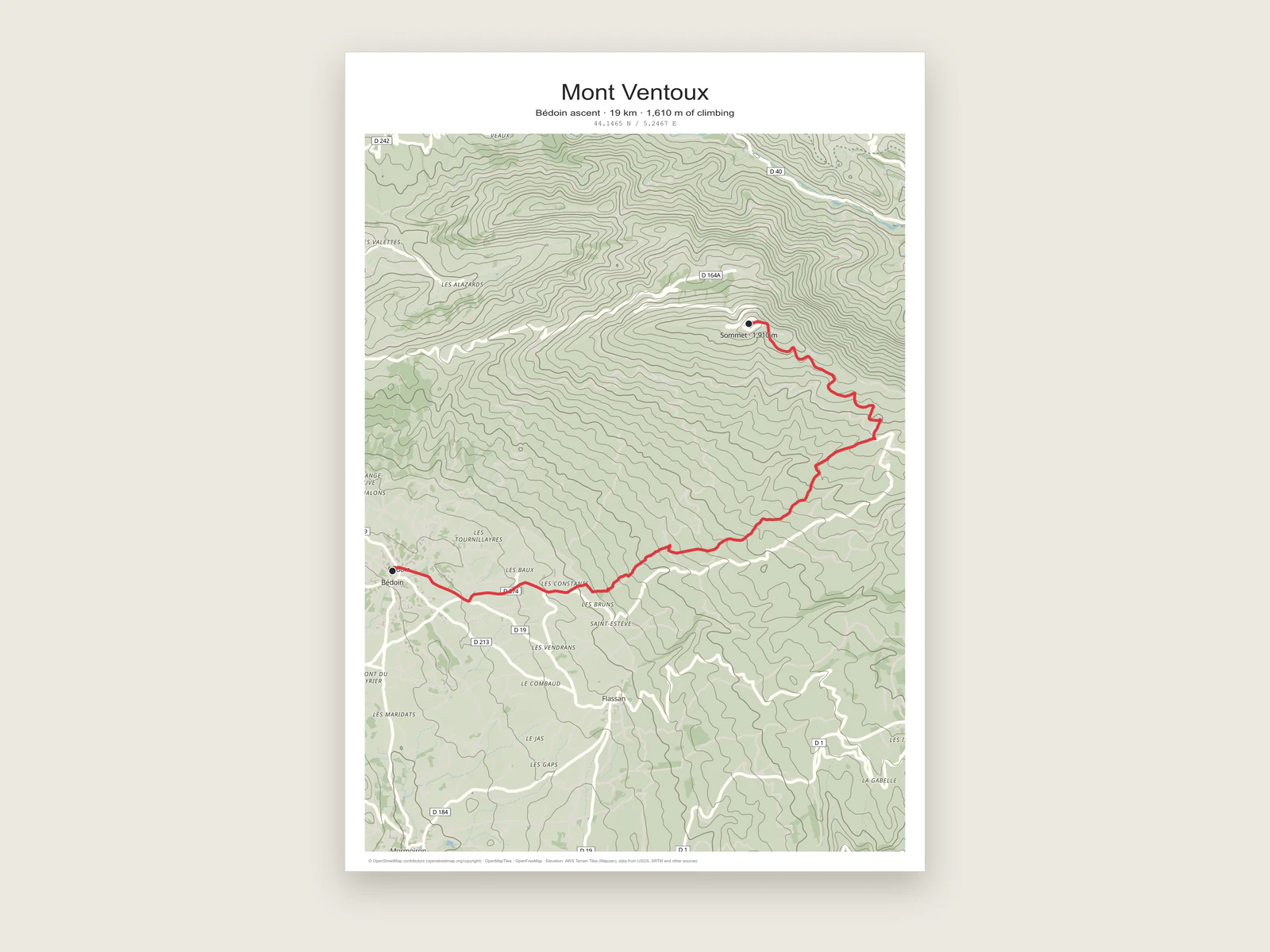
A3 poster of the Mont Ventoux climb from Bédoin on a contour map, with the summit marked

A marathon on an A3 page

A city marathon is a good test for a route poster because the course runs through dense streets and the line has to stay readable over all of them. This is how one A3 portrait poster of a 42.3 km run along the Thames in London comes together.

  • Page

    A3 portrait, 297 × 420 mm. At 300 DPI the PNG comes out at 3508 × 4961 pixels, which is plenty for a print shop.

  • Base map

    A dark style with small labels, so the streets sit back and a bright course reads first.

  • Route line

    A thick orange line that stands out against the dark streets and can be followed from across a room. The width table below gives printed sizes.

  • Start and finish

    Two white circle markers, one at each end of the course, each with a short label.

  • Text

    The city and distance as the title, a personal line and the finish time as the subtitle, and the coordinates underneath in a monospaced font.

  • Export

    PDF for the print shop, because it keeps the route as a vector line at the exact page size.
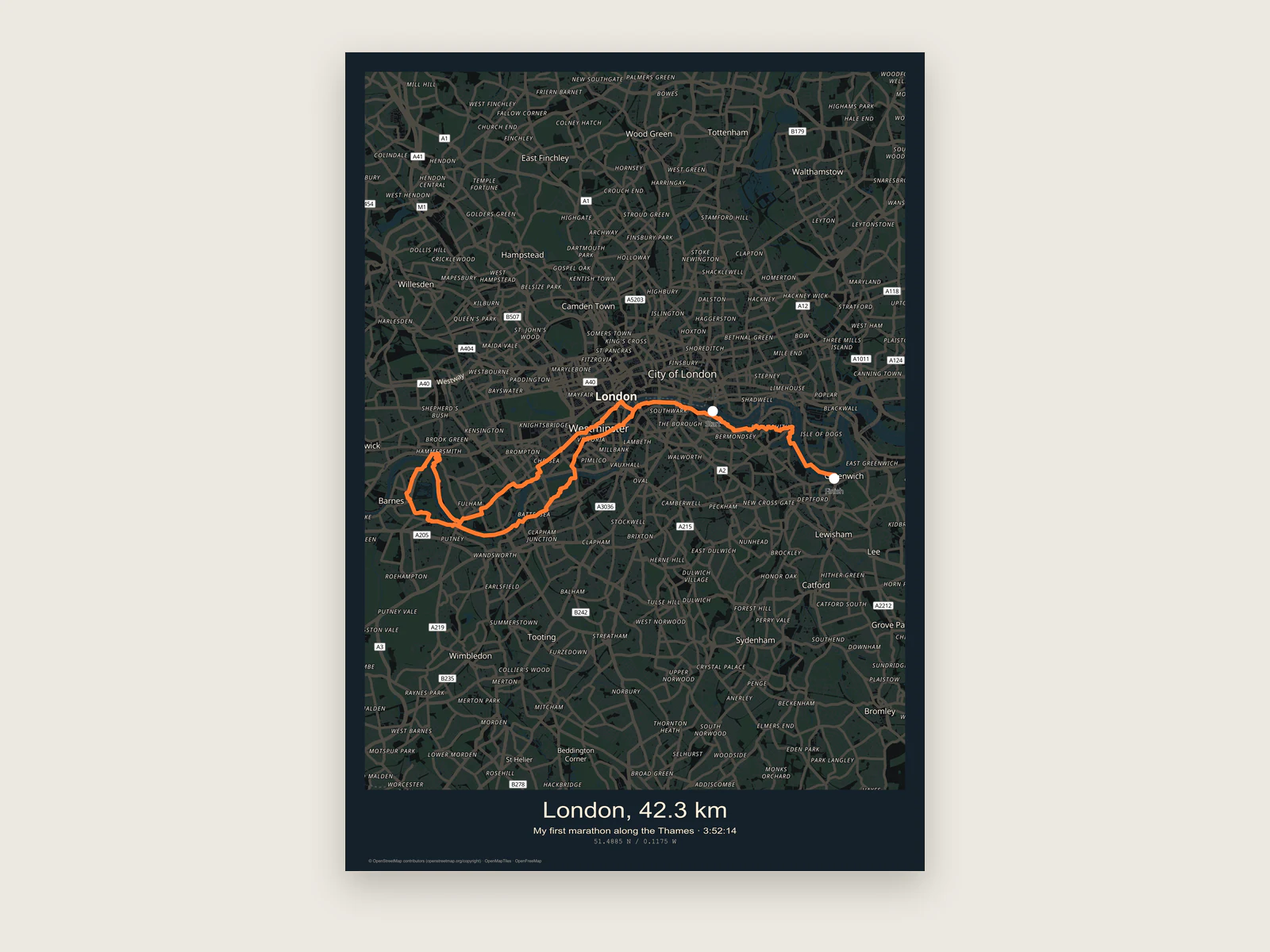
    Dark A3 marathon poster of a 42.3 km run along the Thames with start and finish markers
    The finished A3 marathon poster.The course, start and finish markers, title, finish time and coordinates, with the map credit in the bottom margin.

From your watch to a print file

Most apps hand you a GPX file in a couple of clicks. Once you have one, the rest happens in the editor.

  1. Export the GPX from your app

    On Strava, open your activity on the website and choose Export GPX from the "..." menu. On Garmin Connect, open the activity, click the gear icon and choose Export to GPX. On Komoot, open the tour and use the GPX download in its menu.

  2. Import it into a new map

    Open the editor, choose Import map data and pick the file. The track arrives as a route layer you can style. The GPX map maker page covers file sizes and how waypoints come in.

  3. Set the page and frame the route

    Pick the page size first, then fit the map to the route. Leave a band of empty space above or below the course if you want the title to sit off the map.

  4. Choose a base map that stays quiet

    Light styles with fewer labels work best under a bright route. Turn down detail and text scale until the streets give context without competing with the line. For a hike, contour lines show the climb on the map itself.

  5. Style the line and mark the ends

    Set the route colour and width, then add a place at the start and another at the finish. For a loop, one place labelled "Start / Finish" keeps the corner tidy.

  6. Add the words

    Use the title for the event or trail name, the subtitle for the date, and the caption for distance and time. Coordinates can go in too, in decimal or degrees-minutes-seconds.

  7. Export

    PDF for professional printing, PNG for a home printer or online print service, layered SVG or PSD if you want to finish the layout in another program.

Pick a line weight that prints well

Route width is set in pixels in the editor. In the PDF, SVG and PSD exports every pixel of width prints as 0.3 mm, so the default 4 px line comes out at 1.2 mm on paper. Use the table as a starting point and check the preview at full page view.

Printed widths for the PDF, SVG and PSD exports.
Route widthPrinted lineWorks well for
2 px0.6 mmA6 and A5 cards, or a second route drawn under the main one
4 px1.2 mmA4 prints and routes through dense city streets
6 px1.8 mmA3 posters that people look at from a metre or two away
8 px2.4 mmA2 posters and long rides where the line carries the whole design
  • Dashed lines read as planned or unfinished. Keep a solid line for the route you completed and use dashes for an alternative or a future attempt.

Add an elevation profile

Open the route and choose Generate elevation profile. The editor samples up to 100 points along the line and reads their heights from the Copernicus GLO-90 elevation model through Open-Meteo. You get distance, elevation range, total ascent and total descent.

Set the chart to metric or imperial, choose a print width between 50 and 300 mm, and switch the curve, gradient fill, elevation markers and grid lines on or off. Download the profile as SVG, PNG or PDF.

For a finished poster, raise the bottom page margin to leave a strip under the map, then place the profile there in your layout program. The layered SVG export and the profile SVG drop into the same document in Illustrator, Affinity Designer or Inkscape.

Elevation profile of the Mont Ventoux climb from Bédoin, 312 m to 1,880 m over 19 km
Route tools include the elevation profile.Generate the profile from the route, style it, then download it as SVG, PNG or PDF.

Ready to start?

Bring your last race onto an A3 page.

Start a route poster

Common questions.

Apps, privacy, sizes and race details for route posters.

Which apps can I use for the GPX file?

Any app that exports GPX, KML or GeoJSON. Strava, Garmin Connect and Komoot all export GPX, and so do the companion apps for most GPS watches.

Can I put several runs or rides on one poster?

Yes. Import each file and it becomes its own route layer. Give each one a colour, then use the layer order to decide which line sits on top.

How do I keep my home address off the poster?

Trim the track before you import it. Strava's Crop option or a free GPX editor such as gpx.studio can cut the first and last few hundred metres. Then put the start and finish places where the trimmed line begins and ends.

What paper size should I choose?

A3 portrait suits most city races and day hikes. Long, thin routes like a coastal ride often look better in landscape or on a custom page size in millimetres.

Can I make a 3D model of the route as well?

Yes. The 3D terrain export can raise the route as a ridge on an STL relief model for 3D printing.

Can I show my finish time or pace?

Yes. Put the time in the subtitle and the distance and pace in the caption, for example "42.2 km · 3:58:12 · 5:39 /km". Each text line has its own font, size and colour.